 LifeMood
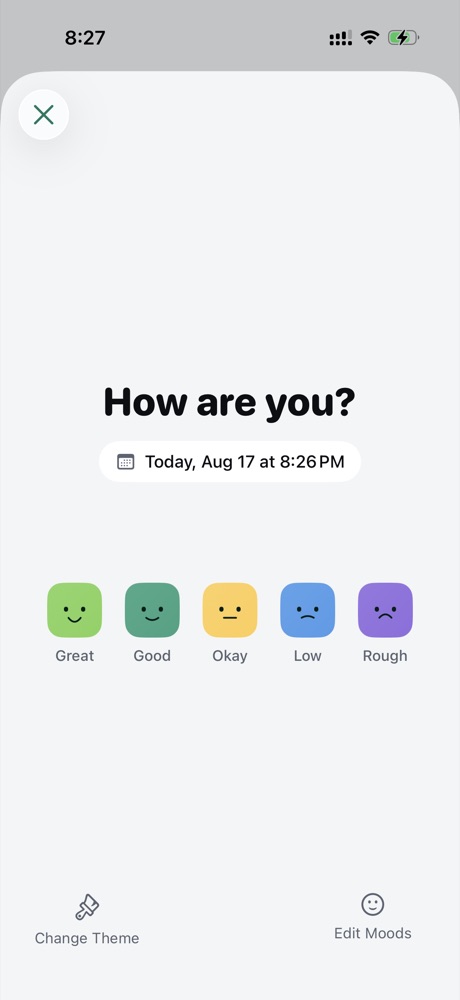
Pick how you feel
Five levels, from Great to Rough. You can rename them, recolour them, add your own, or swap the faces for a different emoji theme.
LifeMood is a mood tracker built to answer that. Pick how you feel, tap what you did, and after a few weeks the pattern you couldn’t see from inside it shows up on a chart.
In one paragraph
LifeMood is a private mood tracker and daily journal for iPhone. A check-in takes about ten seconds — pick a mood, tap the activities that filled the day, and add a note, a voice memo or a photo if you want one. After a few weeks it reads your own history back to you: which activities travel with your best days, which weekday is quietly your worst, and whether your mood has been steadier this month than last. Entries are stored on the device. There is no account, and nothing is uploaded.
How it works
Most journals ask for a paragraph before they will let you log anything. This one asks for a tap, and counts it as a real entry.
Five levels, from Great to Rough. You can rename them, recolour them, add your own, or swap the faces for a different emoji theme.
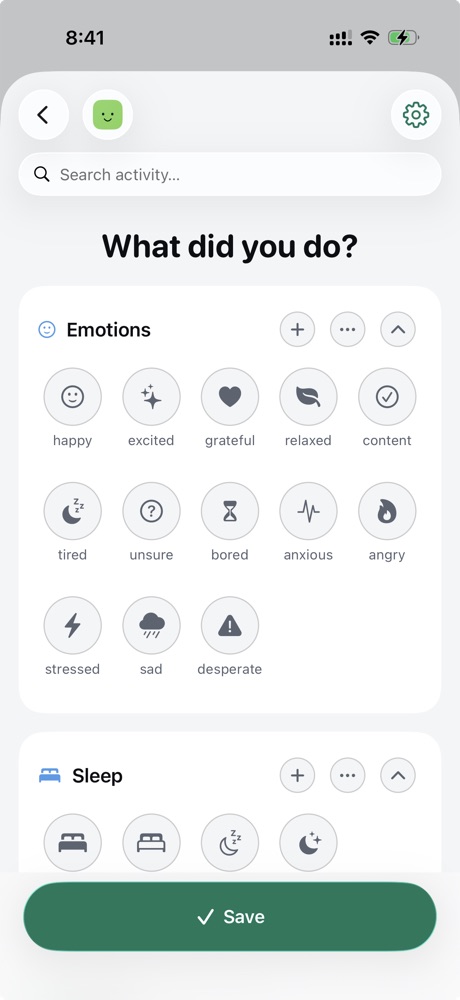
Work, gym, friends, bad sleep, too much coffee. Build your own list with your own icons and colours, grouped however you think about your days.
Some days the whole entry is one tap. Other days you write three paragraphs about why you’re angry. Both count, and neither one nags you.
What you get back
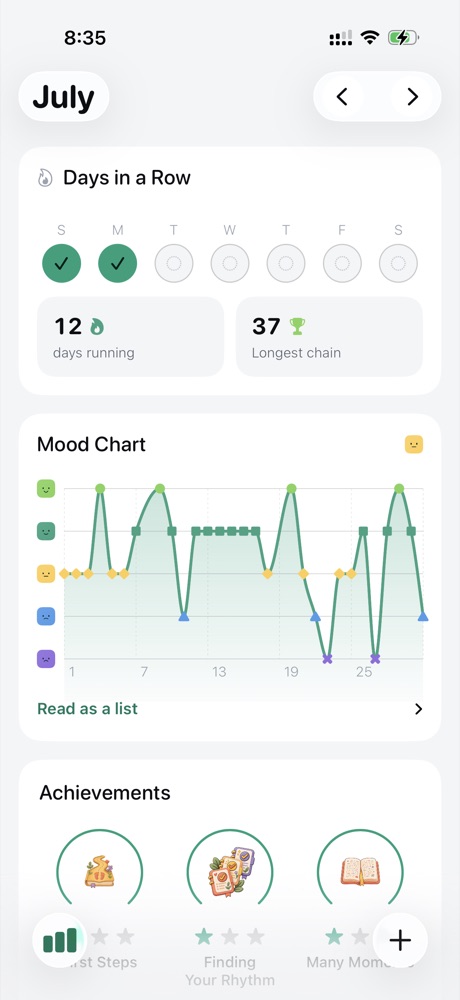
It’s what turns up a month later. LifeMood reads your own history and tells you things you were never going to notice from inside the week they happened.
Your year, at a glance
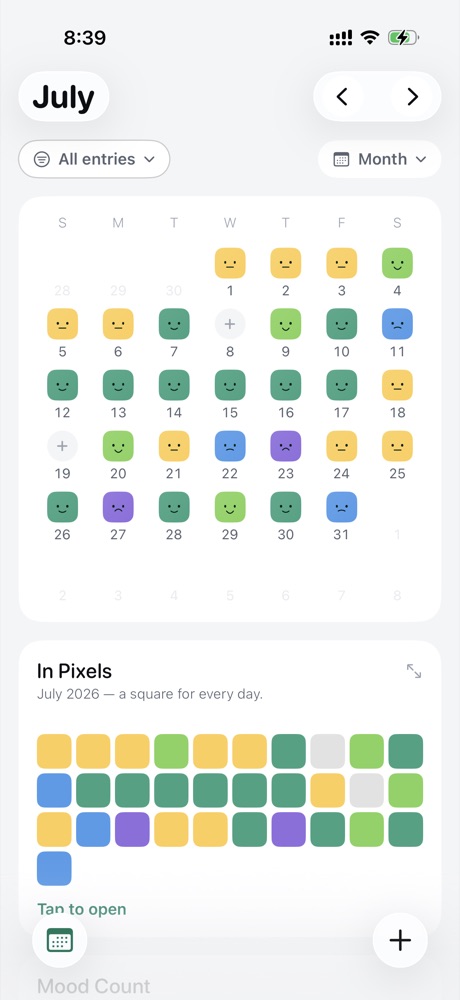
Every day gets a colour. A bad fortnight stops being a feeling and becomes a shape you can point at — and a good run stops being something you have to take on trust.
When one tap isn’t enough
A mood on its own tells you what happened. A sentence tells you what it was about. LifeMood takes whichever you have the energy for.
Privacy
A mood journal holds the things you would not put in a group chat. LifeMood is built so that there is nowhere for them to leak to.
Everything you write, record and photograph is stored on the iPhone. Nothing is uploaded and nobody reads it.
There is no sign-up, no email, no password. Install the app and start logging.
Put a PIN or Face ID in front of the app and it stays shut, even on an unlocked phone.
Advertising identifier collection is switched off in the build, so LifeMood never shows a tracking prompt.
Free & Premium
Everything you need to build the habit is in the free app, including the lock. Premium is sold as a monthly or yearly subscription, or as a one-time purchase.
| Feature | Free | Premium |
|---|---|---|
| Entries, notes and voice memos | Unlimited | Unlimited |
| Photos per entry | One | Unlimited |
| Month calendar and core statistics | Included | Included |
| PIN and Face ID lock | Included | Included |
| Goals and rating scales | One of each | Unlimited |
| Insight cards | Core set | Full set |
| Year in Pixels history | Current stretch | Complete |
| Themes | Light and dark | Every theme |
| CSV export | Included | Included |
| PDF export | — | Included |
How it compares
Most mood trackers are good at day one. The difference shows up in week two, when the novelty has gone and the app still has to be worth opening.
| A typical mood journal | LifeMood | |
|---|---|---|
| A minimal entry | A blank page you have to fill | One tap, and it counts |
| A missed day | A broken streak and a guilt notification | An empty square, and nothing said about it |
| What the stats give you | Charts to interpret yourself | Findings in words, plus the charts behind them |
| Where entries live | A cloud account you sign up for | Your iPhone, with no account at all |
| Bringing it to therapy | Screenshots | PDF export of any date range |
| Recording a bad day | Typing, while feeling bad | A voice memo, or a photo, or nothing |
Questions
LifeMood is a private mood tracker and daily journal for iPhone. You pick one of five moods, tap the activities that filled your day, and optionally add a note, a voice memo or a photo. Over time it charts the pattern behind your best and worst days.
About ten seconds. One tap on a mood is a complete, valid entry. There is no blank page demanding a paragraph before it will let you log anything, so the days you have nothing to say still get recorded.
Yes. Unlimited entries, notes and voice memos, one photo per entry, the month calendar, one goal, one rating scale, the core statistics and the lock are all in the free app. Premium adds unlimited goals and scales, unlimited photos, every theme, the full set of insight cards, complete Year in Pixels history and PDF export — as a monthly or yearly subscription, or a one-time purchase.
Everything you write, record and photograph is stored on your iPhone. Your journal is not uploaded, your notes are not read, and there is no account to create. You can put a PIN or Face ID in front of the app. Advertising identifier collection is switched off in the build, so LifeMood never shows an App Tracking Transparency prompt.
Yes. Logging, charts, the calendar and export all run on the device, so the app works the same with no connection and on a plane.
Many people do. The notes field takes whatever shape you need — a thought record, a DBT diary card, a CBT-style log of what happened and what you made it mean. Export any date range as a PDF to bring to a session, or as CSV to do your own analysis. LifeMood is a self-tracking tool, not a medical device, and it does not diagnose or treat any condition.
Activities that you name, colour and choose icons for, plus rating scales for energy, stress, sleep, caffeine and exercise. Each scale is tracked as its own trend, so you can read energy against mood, or sleep against a bad week.
Yes. Your year appears as a grid of coloured squares, one per day, alongside a month calendar coloured by how each day went. The free app shows the current stretch; Premium unlocks your complete history.
Yes. Any date range exports as a PDF, which is the format most people bring to a therapy session, or as CSV for a spreadsheet. PDF export is a Premium feature.
Not at the moment. LifeMood is an iPhone app and needs iOS 18.0 or later. There is no Android app, iPad app or web version today.
The interface is available in English, Spanish, French, German, Arabic and Hebrew, with right-to-left layout for Arabic and Hebrew.
Three things. It is built for week two rather than day one, so a one-tap entry counts and a missed day is never used to shame you. It reads your history back as findings rather than raw charts, including which activities keep landing on the same day. And it keeps everything on the device with no account, which most cloud-backed journals do not.
In a month you’ll have something worth reading.
Free on iPhone, iOS 18.0 or later. No account needed.